

Zero to Hero - How to configure Defender for Endpoint AV Protection for Windows - Complete Guide
Table of Content
Introduction
Welcome back to the Zero to Hero series!
In the previous articles, we focused on onboarding devices into Microsoft Defender for Endpoint. That gives you visibility, and is of course a good start, but doesn’t give you necessarily strong protection.
This is where Defender Antivirus/Next Generation Protection (NGP) come into play.
Defender AV is not “just antivirus” anymore, it’s a core component of the Defender XDR protection stack.
And your actual security level depends almost entirely on how you configure it.
In this article, we’ll focus on building a scalable configuration approach, starting with decision guides for clients and servers, before diving into the different management options and the settings that really matter.
Defender for Endpoint AV/NGP Configuration
Before we start talking about configuration, it’s important to understand what we are actually configuring.
Microsoft Defender Antivirus (AV) is the core protection engine on the endpoint. It’s built into Windows and provides the baseline for detecting and blocking threats.
But modern protection goes beyond signature-based detection.
This is where Next Generation Protection (NGP) comes in.
NGP extends the classic antivirus model using:
Machine learning & AI
Behavior monitoring (process, file, memory)
Heuristics and anomaly detection
Cloud-delivered intelligence
Instead of relying on known signatures, Defender analyzes how something behaves.
From my experience, this is one of the biggest things people underestimate.
Modern malware is often polymorphic or fileless, meaning:
By the time you have a signature, it’s already too late.
NGP is designed to detect threats at the first sign of abnormal behavior, often within milliseconds.
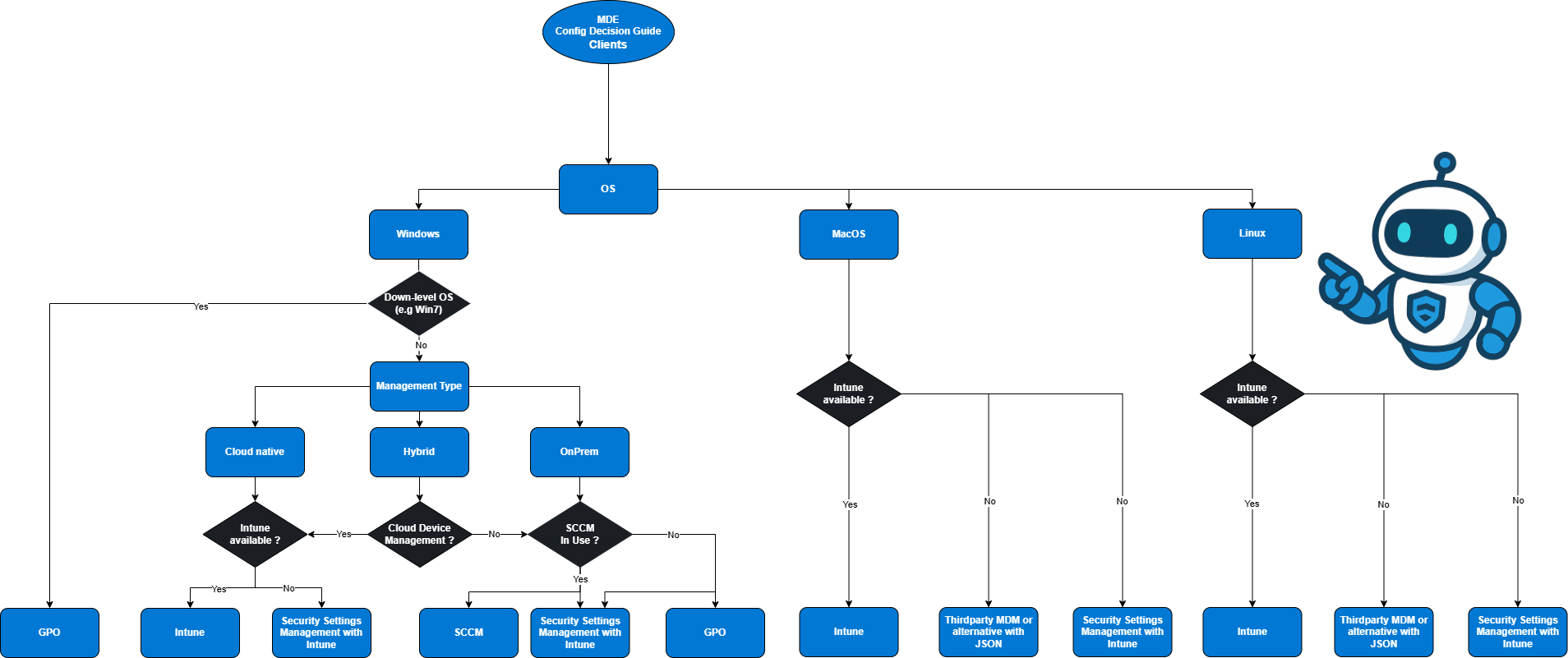
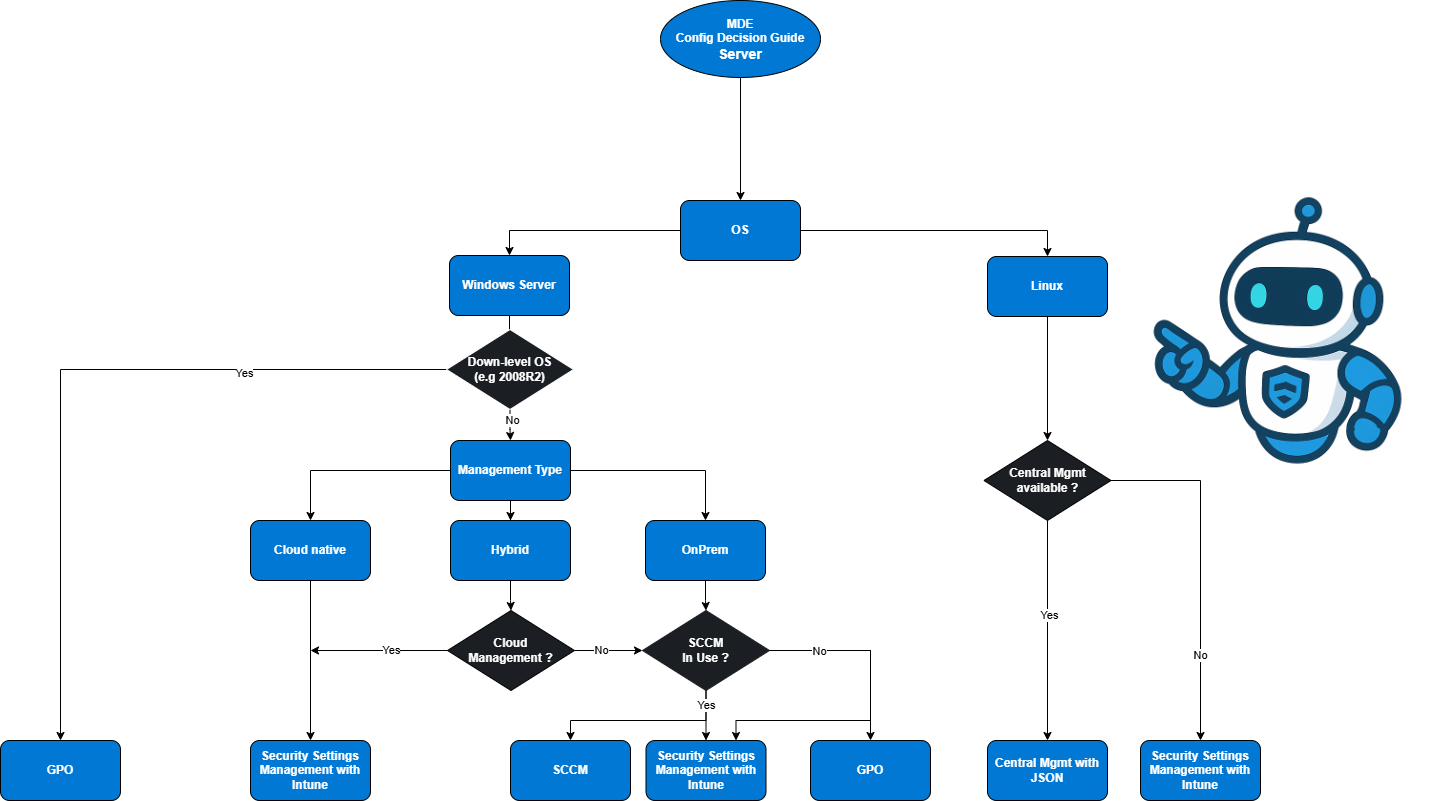
The following decision guides help you choose the right configuration approach for clients and servers.
Decision Guide for AV Configuration Deployment Clients
Decision Guide for AV Configuration Deployment Server
Management Options for Defender AV/NGP
Defender for Endpoint doesn’t tie you to a single management approach. In real environments, AV/NGP configuration is often deployed through multiple approaches, sometimes intentionally, sometimes historically grown.
The most common management options you’ll see are:
Microsoft Intune (MDM)
Group Policy (GPO)
Microsoft Configuration Manager (SCCM)
Security Settings Management via Defender for Endpoint
From my experience, the challenge is usually not only how to configure Defender AV, but deciding which system should be the authoritative source.
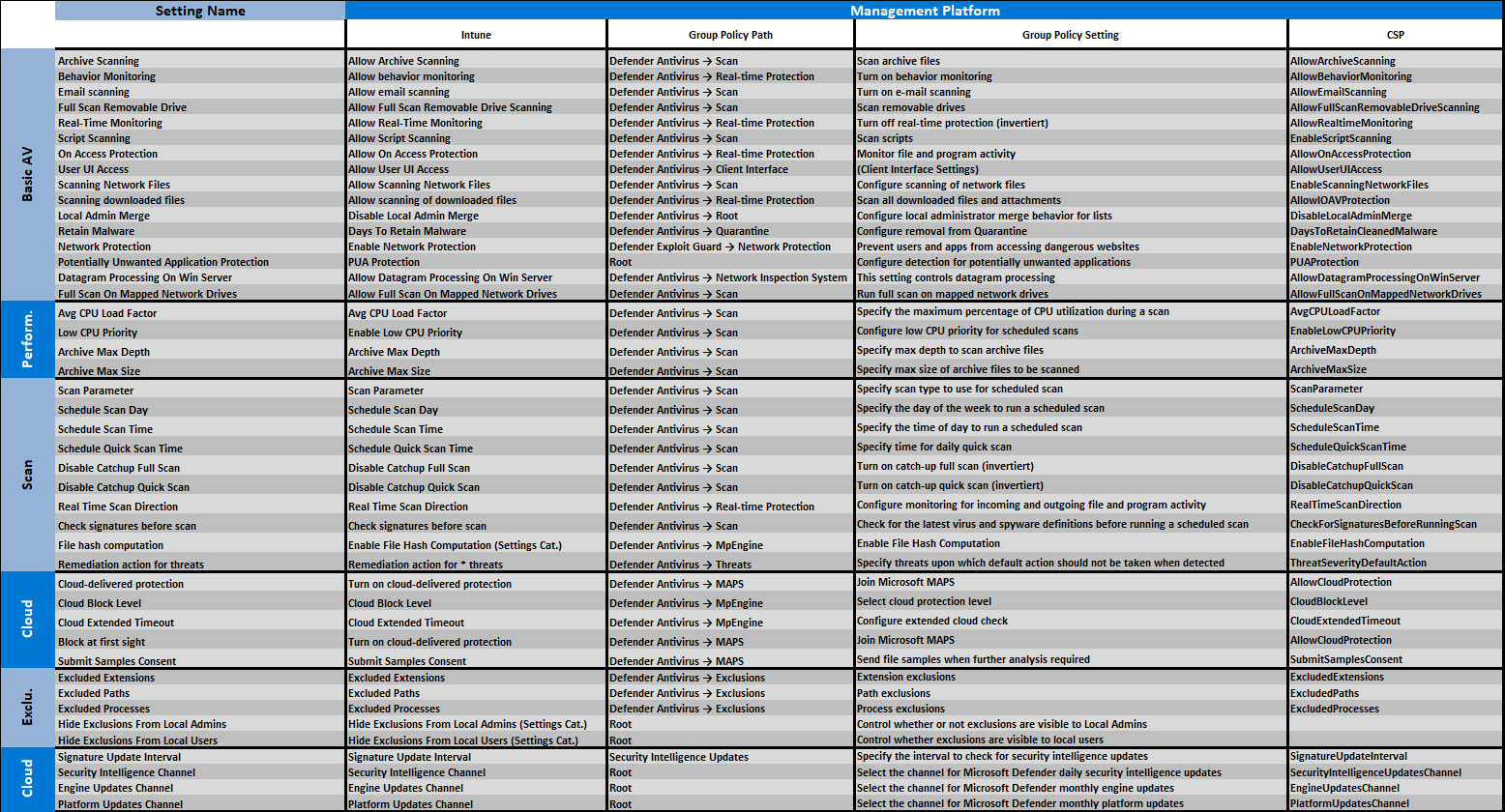
Key Configuration Settings Mapping (Intune / GPO / CSP)
Before diving into each management option, there’s one challenge I see in a lot of projects:
To solve exactly this problem, I built a side-by-side mapping of the most relevant Defender AV / NGP settings across:
Intune (Settings Catalog / Endpoint Security)
Group Policy
CSP
This gives you a translation layer between management worlds.
Intune
Microsoft Intune is the modern and preferred management approach for configuring Defender AV / NGP—especially for client environments.
If you’re aiming for a cloud-native or hybrid modern workplace, Intune should be your primary choice.
How Defender AV is configured in Intune
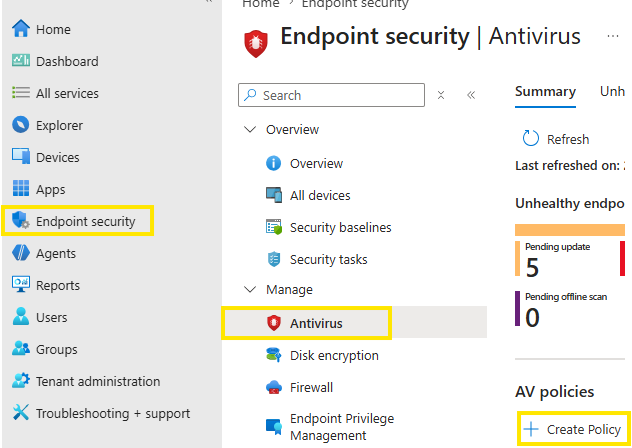
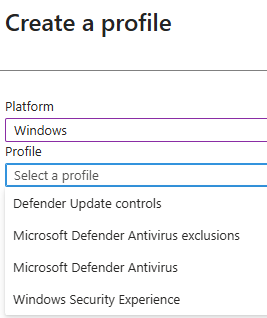
There are two main ways to configure Defender AV in Intune:
Endpoint Security → Antivirus policies
Simplified and opinionated
Focus on security-relevant settings
Recommended for most scenarios
Settings Catalog/CSP
Necessary for specific/additional configurations not included in the endpoint security profiles
GPO
Group Policy (GPO) is the classic and still used way to configure Defender AV, especially in traditional on-prem or domain-joined environments.
Even though many organizations are moving to Intune, GPO is still present in real-world setups.
How Defender AV is configured via GPO
Defender AV settings are configured under:
Computer Configuration
└── Administrative Templates
└── Windows Components
└── Microsoft Defender Antivirus
Configuration Manager
Microsoft Configuration Manager (SCCM) still appears in many environments, but when it comes to Defender AV / NGP configuration, it is no longer the preferred approach.
SCCM is typically used in Large, established enterprise environments or Hybrid or co-management scenarios
There are also more modern integrations like Tenant Attach or co-management workloads with Intune.
Security Settings Management for Defender for Endpoint
Security Settings Management is probably the most misunderstood—but also one of the most powerful—modern approaches to manage Defender AV.
At a high level, it allows you to:
How it works
The idea is simple:
Defender for Endpoint becomes the policy enforcement channel, while Intune remains the policy definition layer.
The flow looks like this:
A device is onboarded to Defender for Endpoint
The device checks if it is enrolled in Intune (MDM)
If not, Security Settings Management is activated automatically
The device gets a (real or synthetic) Entra ID identity
Policies are assigned via Intune (Endpoint Security policies)
The Defender agent pulls and enforces the policies locally
Status is reported back to Defender + Intune
The interesting part here is the identity layer:
If a device is already Entra-joined → it uses that identity
If not → a synthetic Entra ID object is created automatically
Of course the intune connection between defender and intune hast o be established already.
From there you can enable the feature: security.microsoft.com -> settings -> Endpoints -> Enforcement scope
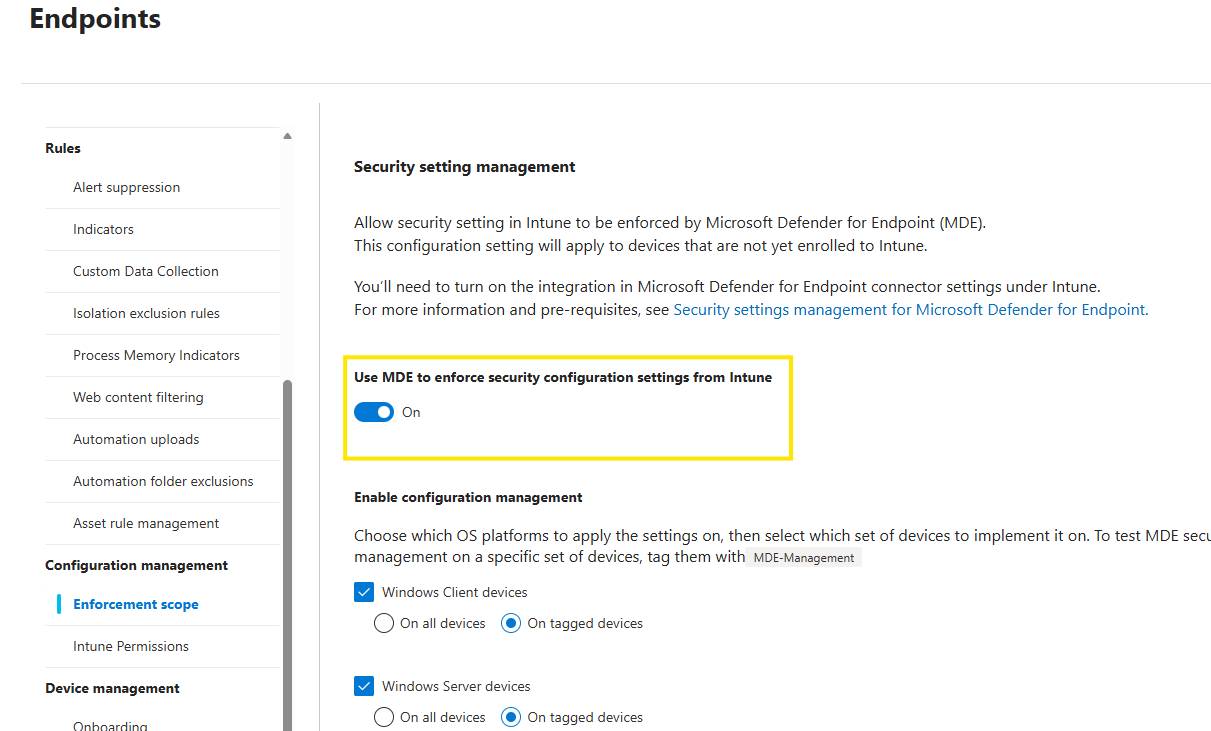
Devices managed over that way differ in intune from regular intune enrolled devices:

But you are able to target supported policies to those devices. Supported policies for the security settings management are marked over the column field target: “MicrosoftSense”

Sync behavior
Another aspect is the current policy sync timing, which differ from Intune MDM:
After successful enrollment → first sync after ~10 minutes
Afterwards → regular sync every ~90 minutes
Keep in mind that Security Settings Management is still evolving:
Currently, not all Defender security settings are supported
The focus is on the most relevant controls, including:
Antivirus policies
Firewall & firewall rules
Endpoint Detection & Response (EDR)
Attack Surface Reduction (ASR) rules
From my experience, this is usually sufficient for a solid security baseline, BUT for some few settings, you might additionally still need Intune (MDM) or other approaches.
Conclusion
Configuring Defender AV and Next Generation Protection is less about the tool itself and more about how consistently you manage it. From my experience, most issues come from overlapping management approaches and unclear ownership, not missing capabilities. The key is to define one clear configuration path, typically fully Intune management for clients and Security Settings Management for servers, reducing legacy dependencies like GPO and SCCM over time. Defender AV is a powerful, cloud-driven protection system, but its effectiveness depends entirely on its configuration.